From meeting to task: capturing meeting outcomes reliably
Many meetings end with outcomes nobody follows up on. How to record decisions and tasks so that it is clear who does what by when – and what role AI suggestions can play.
A meeting is only as good as what happens afterwards. Capturing meeting action items reliably takes more than minutes: every agreed task needs an owner and a due date, and it has to end up where the team actually works. This article describes a simple process from meeting to task – and why AI suggestions can help but do not replace a human review.
Why outcomes get lost after the meeting
The usual causes are easy to list:
- Unclear ownership: “We’ll look into it” often means nobody feels responsible.
- No due date: without a date, the task slips behind everything that has one.
- Wrong place: the minutes sit as a file in a folder, while work is planned on a board or in the calendar.
- Too late: if the minutes go out days later, people remember the agreement differently.
None of these causes is technical. Tools only help once it is clear what makes an outcome binding.
What makes a meeting outcome binding
It helps to distinguish three kinds of outcomes:
| Type | Characteristic | Example |
|---|---|---|
| Decision | A choice that applies from now on | “We will deliver in two construction phases.” |
| Action item | An activity with an owner and a due date | “Anna agrees the schedule with the structural engineer by Friday.” |
| Open question | A topic without a result that needs to come back on the agenda | “Find out whether we can apply for funding.” |
For every action item, a short checklist applies:
- Concrete wording: an imperative verb and a recognisable result.
- Exactly one owner: others may help, but one person follows up.
- A due date: a realistic date is better than “soon”.
- Context: a reference to the meeting, so it remains clear later why the task exists.
The most reliable approach is to state the owner and due date out loud during the meeting and confirm them briefly. Even good minutes cannot conjure up what was never said.
AI suggestions: helpful, but not flawless
Automatic transcripts and AI analysis take a lot of writing off your hands. But they have limits worth knowing:
- Recognition errors: speech recognition accuracy depends on language, audio quality and speaking style. For the widely used Whisper model, OpenAI itself notes that performance varies widely by language (Whisper documentation).
- Invented passages: a study presented at ACM FAccT 2024 found entire sentences that were not in the audio in roughly 1% of the Whisper transcriptions examined – more often with long pauses (Koenecke et al., “Careless Whisper”). The study reflects the state of 2023.
- Wrong attribution: a language model can assign a task to the wrong person or read an idea as an agreement.
Data protection matters too: who took on a task is information about a person. The GDPR requires personal data to be accurate (Art. 5(1)(d) GDPR). An AI suggestion should therefore only become a binding task once a human has reviewed and approved it.
A process from meeting to task
- During the meeting: state tasks with names and due dates; summarise the list at the end.
- Right afterwards: the moderator or a named person reviews the minutes or the AI suggestions the same day.
- Approve: correct suggestions, discard unnecessary ones, set the owner and due date for each task.
- Record: create the tasks where the team plans – on the board, in the owner’s calendar.
- Inform: send a summary with decisions and tasks to everyone involved.
- Follow up: go through open tasks at the start of the next meeting.
If you transcribe meetings, clarify the legal questions first – consent, works council, retention periods. “AI meeting transcription: consent, works councils and the GDPR” gives an overview.
How it works in nest54
In nest54, the path from video call to task runs through the transcript. Step by step:
- Analysis on request: once the transcript is ready, the person who started the transcription can request the AI analysis. It does not start automatically.
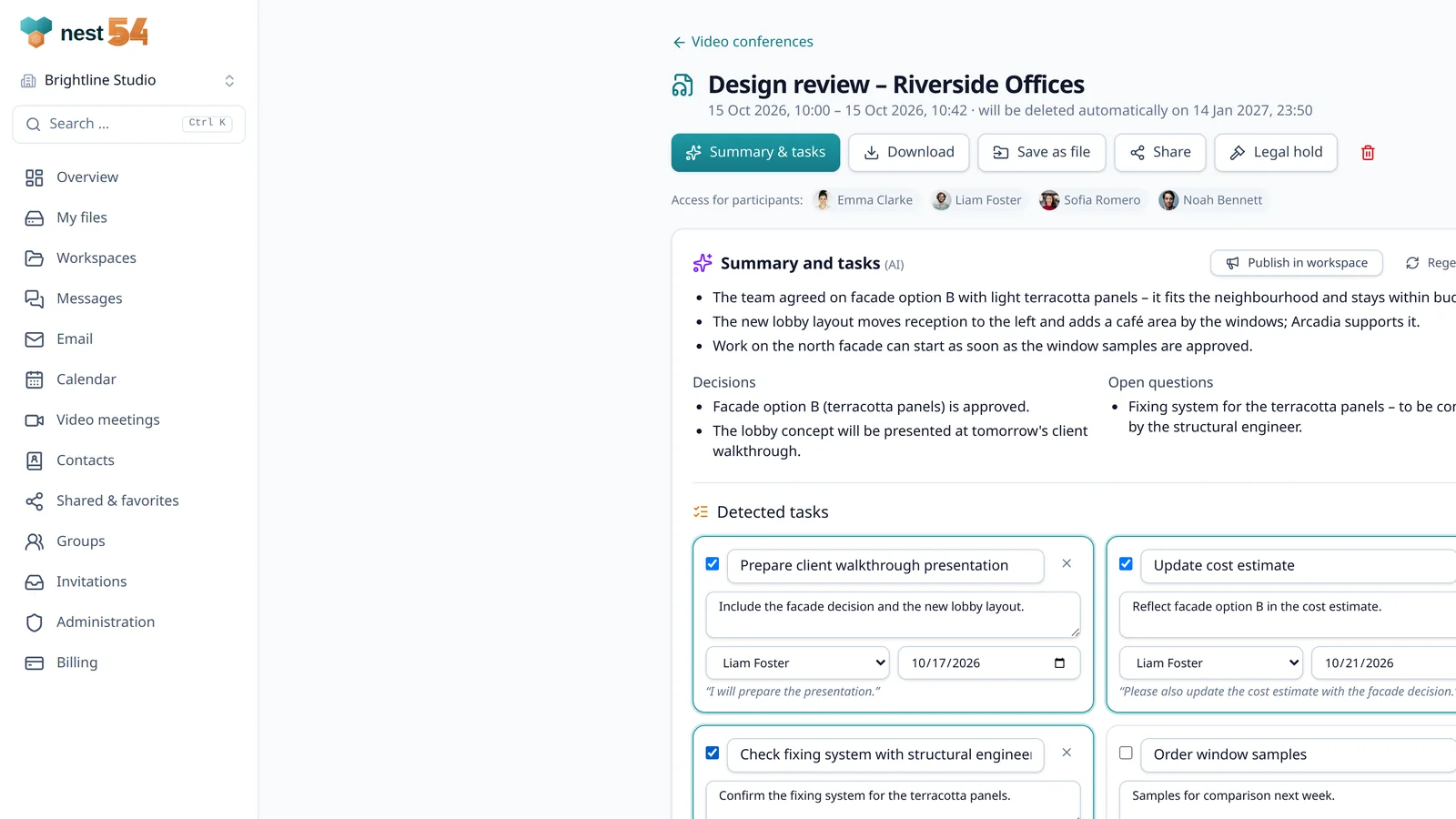
- Result: the analysis delivers a bullet-point summary, decisions, open questions and suggested tasks. Each suggestion can include an owner, a due date and a short verbatim quote from the transcript as evidence.
- Review and select: the suggestions appear as a list from which you pick individual items. Title, description, owner and due date can be edited before the task is created, and unsuitable suggestions can be discarded.
- Owner required: each task needs a person from the meeting; the internal participants are available to choose from. Without a due date, the next working day is used.
- Board and calendar: if the call took place in a workspace, a board “Aufgaben: …” (tasks) is created there with one card per task, plus an entry on the due date in the workspace calendar. Without a workspace, the task goes into the owner’s calendar and they are notified.
- Link back: every card contains a link to the transcript and the quote, so it stays clear where the task came from.
- Share the summary: for workspace meetings, the summary with participants, decisions, open questions and recorded tasks can be posted to the workspace chat.
More on boards, calendars and transcription is available at Features.
Requirements and limitations
To help you plan realistically, here are the constraints:
- Transcription must be allowed by the organisation, and every participant must have agreed to the notice before their audio is recorded.
- Each organisation decides whether to enable the AI analysis. For the analysis, the transcript text is sent to a connected external AI service; speech recognition itself runs on nest54’s servers. The AI features require add-on credit; details are on Pricing.
- Only internal participants can be owners. Tasks for guests or partners from other organisations are added to the board manually as usual.
- The AI can only analyse what was said and recognised. Reviewing before creating tasks therefore remains part of the process – that is exactly what it is designed for.
How the local speech recognition works technically is explained in “Local speech recognition instead of a US cloud: how Whisper and co. work” (coming on January 13, 2027).
Frequently asked questions
What makes a meeting action item binding?
Concrete wording, exactly one owner, a due date and a reference to the meeting. Ideally, the owner and due date are stated and confirmed during the meeting itself.
Can I accept AI task suggestions as they are?
Better not without review. Speech recognition and language models can mishear words, invent sentences or attribute tasks to the wrong person. In nest54, suggestions therefore only become cards and calendar entries after you select and approve them.
Where does nest54 put approved tasks?
For a call in a workspace, a board with one card per task and an entry in the workspace calendar are created. Without a workspace, the task goes into the owner’s calendar and they are notified.
Sources
- Whisper – repository and documentation – OpenAI (GitHub)
- Careless Whisper: Speech-to-Text Hallucination Harms (ACM FAccT 2024) – Koenecke, Choi, Mei, Schellmann, Sloane (arXiv)
- Regulation (EU) 2016/679 (GDPR), Art. 5 – EUR-Lex