MCP explained simply: how the Model Context Protocol connects tools
The Model Context Protocol gives applications one standard way to talk to services like GitHub or Jira. We explain its architecture, building blocks and transports – and how nest54 turns it into mini-apps.
The Model Context Protocol (MCP) is an open standard that lets applications talk to external services such as GitHub, Jira or a database in one consistent way. Instead of building a separate integration for every tool, an application implements MCP once and can then use any service that offers an MCP server. This article explains the architecture, the building blocks (tools, resources and prompts), the transports, and why it matters for teams. At the end, we show how nest54 uses MCP for mini-apps.
What is the Model Context Protocol?
Anthropic introduced MCP on 25 November 2024 as an open standard for connecting AI assistants to the systems where data lives. At launch, ready-made servers were available for Google Drive, Slack, GitHub, Git and Postgres, among others.
The specification describes MCP as an open protocol that connects applications built on language models with external data sources and tools. It names the Language Server Protocol as its inspiration, which standardised how programming languages plug into development environments. The idea: a service exposes its functions once as an MCP server, and many applications can then use it.
Since 9 December 2025, MCP has been part of the Agentic AI Foundation, a directed fund under the Linux Foundation co-founded by Anthropic, Block and OpenAI. According to Anthropic, MCP’s governance model remains unchanged.
Host, client, server: how MCP is structured
MCP exchanges JSON-RPC 2.0 messages between three roles:
- Host: the application that initiates connections, for example an AI assistant, a development environment or a collaboration platform.
- Client: the connector inside the host that talks to a server.
- Server: the service that provides data and functions, such as GitHub’s MCP server.
Specification versions are dates that mark the last backwards-incompatible change. According to the versioning page, the current version is 2026-07-28. It made the protocol stateless: every request is self-contained, and the earlier “initialize” handshake is gone. Versions up to 2025-11-25 still use that handshake.
Tools, resources and prompts
A server can offer three kinds of capabilities:
| Building block | Meaning per the specification | Example |
|---|---|---|
| Tools | Functions that get executed | fetch the open pull requests of a repository |
| Resources | Context and data for the user or the model | the content of a file or a documentation page |
| Prompts | Templated messages and workflows | a prepared instruction such as “summarise bug report” |
Each tool has a name, a description and an input schema written in JSON Schema. The server can also add hints, for example whether a tool only reads (readOnlyHint) or may destroy data (destructiveHint). The specification is explicit: clients must treat such hints as untrusted unless they come from a trusted server.
In the other direction, a server can use “elicitation” to ask the user for additional information. The former client features sampling and roots are marked as deprecated in version 2026-07-28.
Transports and authorisation
The specification defines two standard transports:
- stdio: the server runs as a local process on the same machine as the host. Credentials come from the environment.
- Streamable HTTP: the server runs on the network and is reached over HTTP. The older HTTP+SSE transport has been deprecated since 2025-03-26.
For HTTP connections, the specification describes optional authorisation based on OAuth 2.1. Servers publish Protected Resource Metadata (RFC 9728), clients sign in with PKCE and use resource indicators (RFC 8707) to state which server a token is for. Servers may only accept tokens that were explicitly issued for them.
Why MCP matters for teams
MCP is no longer just an Anthropic project. A few examples with sources:
- OpenAI supports MCP servers in its Agents SDK.
- Since December 2025, Google has offered managed MCP servers for its own services, starting with Maps, BigQuery, Compute Engine and GKE.
- Microsoft made MCP generally available in Copilot Studio in May 2025.
- GitHub runs an official MCP server whose hosted version has been generally available since September 2025. Atlassian also offers a hosted MCP server for Jira and Confluence.
For teams, this means connecting a tool depends less often on a custom-built integration. But a standard also brings responsibility. An MCP server receives credentials and, depending on the tool, can change data. What to watch out for with permissions, tokens and prompt injection is covered in “Using MCP securely: permissions, tokens and prompt injection” (coming on December 16, 2026).
How nest54 uses MCP for mini-apps
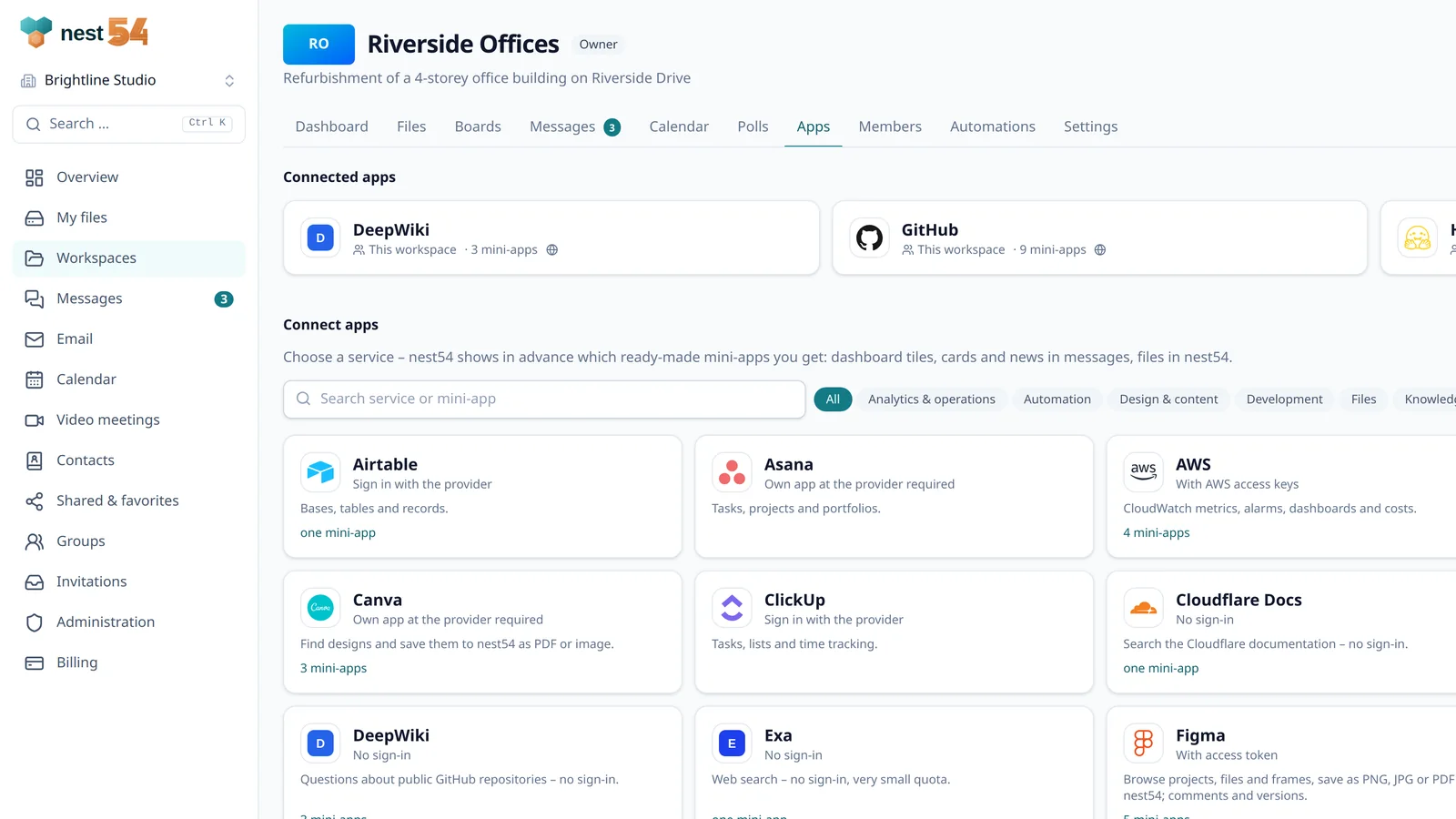
In nest54, every workspace has an “Apps” tab. There you connect external services from a suggestion list of more than 20, including GitHub, GitLab, Jira and Confluence, Linear, Notion, Sentry, Airtable, Miro, Box, AWS and Matomo. Most are connected through their MCP server; Figma is connected through Figma’s REST API.
Instead of showing raw tools, nest54 offers ready-made mini-apps per service, such as “Open pull requests”, “Commits per day” or “Tickets by status”. They appear
- as a tile on the workspace dashboard (list, table, key figure, line, bar or pie chart),
- as a card or subscribed updates in messages,
- in Files, for example to save Figma frames as PNG, JPG or PDF or to bring in files from GitHub.
One difference from AI assistants: in nest54, no language model decides which tool to call. Each mini-app calls a fixed function with values from a fixed template, and the response is displayed as data. Mini-apps only read; functions that change data stay blocked. If a provider changes a function, the mini-app pauses until someone reviews it again.
Further MCP servers can be connected by URL if the organisation’s policy allows it. Their functions are listed in the expert section and must be approved before use. Connections can be personal, per workspace or for the whole organisation. What this looks like in practice is shown in “One dashboard for GitHub, Figma and Jira: project status in one place” (coming on January 27, 2027).
Where nest54 fits – and where it doesn’t
nest54 is not a platform for AI agents that act on their own across several tools. If that is what you need, you want an AI assistant with MCP support. nest54 uses MCP to bring data from specialist tools to where a team already works together: the workspace with files, chat, board and calendar. Not every provider allows this; some only admit third-party applications after their own review. For an overview of all areas, see Features.
Frequently asked questions
Is MCP only meant for AI applications?
The specification targets applications built on language models. The protocol itself does not prescribe how tools are invoked, though. nest54 uses MCP without a language model: mini-apps call fixed functions.
Who develops MCP?
Anthropic introduced MCP in November 2024 and donated it to the Agentic AI Foundation under the Linux Foundation in December 2025. According to Anthropic, the project’s governance model remains unchanged.
What is the difference between tools, resources and prompts?
Tools are executable functions, resources provide context and data, and prompts are templates for messages and workflows. A server does not have to offer all three.
Do I need programming skills to use mini-apps in nest54?
No. You connect a service in the Apps tab and pick a mini-app. Depending on the service, you sign in with the provider or enter an access token.
Sources
- Introducing the Model Context Protocol – Anthropic
- Model Context Protocol – Specification (2026-07-28) – Model Context Protocol
- Versioning – Model Context Protocol
- Tools (Specification 2026-07-28) – Model Context Protocol
- Transports (Specification 2026-07-28) – Model Context Protocol
- Authorization (Specification 2026-07-28) – Model Context Protocol
- Deprecated features (Specification 2026-07-28) – Model Context Protocol
- Donating the Model Context Protocol and establishing the Agentic AI Foundation – Anthropic
- Linux Foundation Announces the Formation of the Agentic AI Foundation – Linux Foundation
- Model context protocol (MCP) – OpenAI Agents SDK – OpenAI
- Announcing Model Context Protocol (MCP) support for Google services – Google Cloud
- Model Context Protocol (MCP) is now generally available in Microsoft Copilot Studio – Microsoft
- Remote GitHub MCP Server is now generally available – GitHub
- Atlassian Rovo MCP Server is generally available – Atlassian